
Mornin’
An alarm clock for iPhone, by Retrofire LLC
The alarm clock that makes you prove you’re awake. Your alarm, your morning routine and your commute, together in one app.
In final testing. Coming to the App Store in fall 2026.
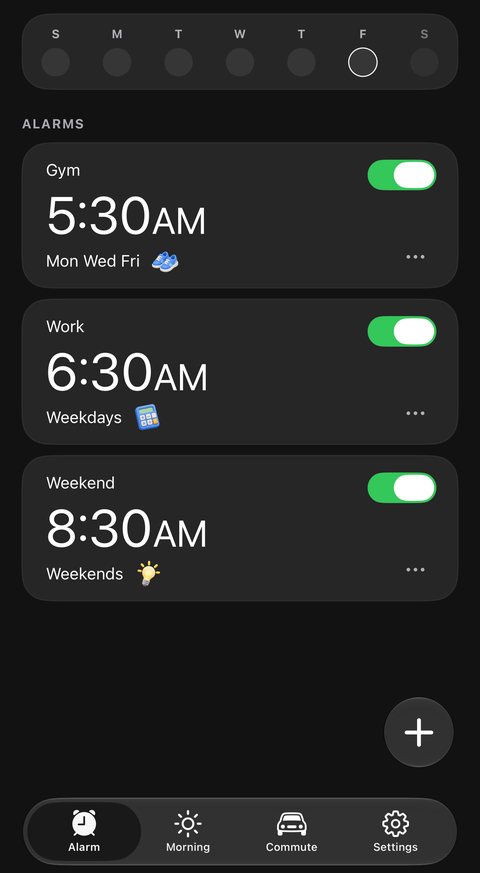
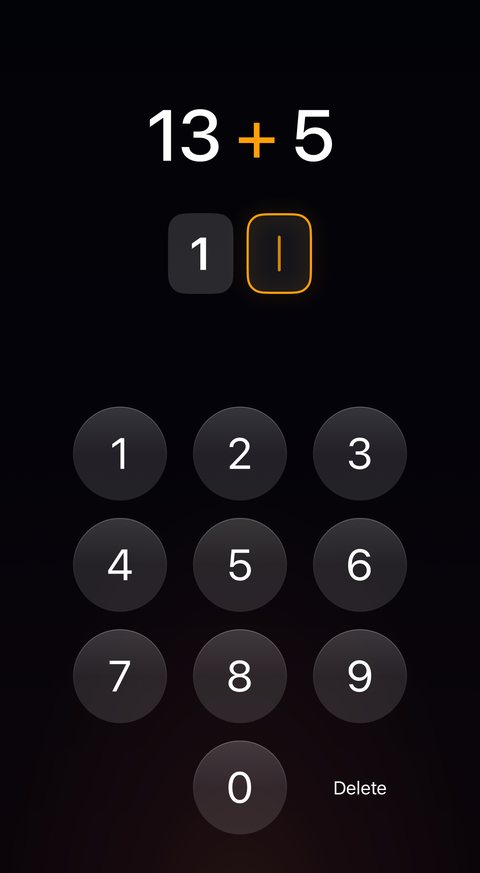
Alarms
An alarm that makes sure you’re up.
Mornin’ sets every alarm with Apple’s own alarm system, the one built into iPhone.
Rings on your lock screen
Every alarm rings full screen on your lock screen, even when the app is closed.
Swipe it away and it comes back
Sliding to stop only pauses the alarm. It rings again a few seconds later until your mission is done.
Backup rings
Every alarm has 17 backup rings. Finishing your mission cancels them all, and if nothing stops it, Mornin’ stops ringing on its own after about two hours.
Snooze you have to sign for
Snooze is off for every alarm. To turn it on, you sign a waiver with your finger.
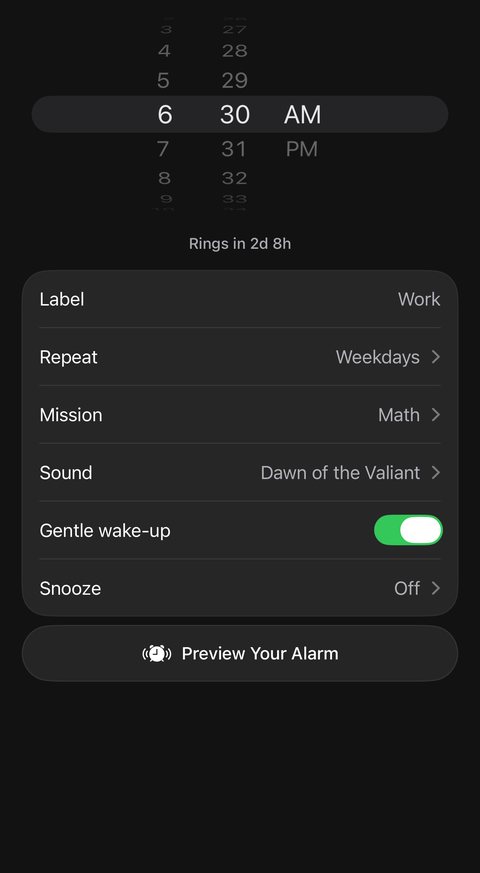
Gentle wake-up
The alarm starts soft and builds to full volume over one minute.
Repeat any way you like
Pick days of the week, a one-time alarm, or specific dates on a calendar, made for shift work.
Five songs made for Mornin’
Built into the app, so they play with no connection.
Preview Your Alarm
Rehearse the real ring screen, with the sound and your mission, before the morning comes.
My Reason
Write down why you’re getting up, and see it while the alarm rings.
Keeps your alarms set
Each time you open Mornin’, it checks that your iPhone still has every alarm and sets again any that went missing.
Bedtime reminder
A notification 6 to 10 hours before your next alarm, telling you when to turn the lights out.
Follows you when you travel
Like the Clock app, a 7:00 AM alarm rings at 7:00 AM local time, wherever you are.
A backup notification
At the alarm time Mornin’ also sends a notification, which plays your alarm sound if your iPhone could not set the alarm itself.
Wake-up missions
Choose what it takes to stop your alarm.
Fourteen missions in four groups. Chain up to five on one alarm, and tap Try to play any mission first so you know what tomorrow holds.
Make each mission your own
Easy, Medium or Hard, how many problems, phrases, rounds, shakes or steps, and how long the light has to stay on.
A plan for no signal
Photo missions are checked online, with your permission. If the photo can’t be checked, that morning’s mission becomes Let the light in, which works entirely on your iPhone.
Opens straight on your mission
Open Mornin’ while the alarm rings and you land right on it.
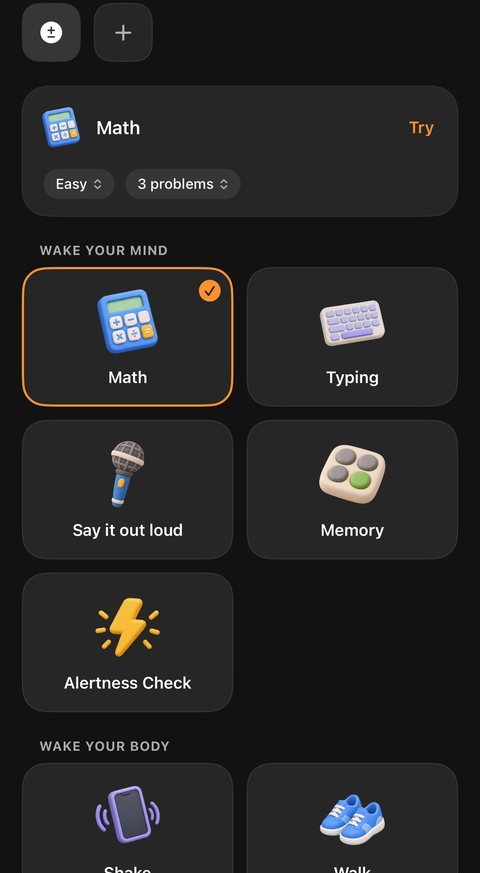
Wake your mind
Gets your head working before you move.
Math
Solve sums on a keypad, from Easy to Hard.
Typing
Retype a phrase exactly, letter for letter.

Say it out loud
Say a phrase you wrote. Heard on your iPhone, never recorded.
Memory
Watch the pads light up, then repeat the pattern.
Alertness Check
Tap each sun the moment it appears.
Wake your body
Get your body moving.
Shake
Shake your phone until the alarm gives in.

Walk
Take a set number of steps, counted by your iPhone’s motion sensors.
Make your bed
Make it, then take a photo of it to be checked online.
Let the light in
Turn on a lamp or open the curtains so your camera sees a lit room.
Prove you’re really up
A matching photo or your hidden code.
Photo match
Photograph a spot away from bed, then match it at the alarm.
Scan a code
Hide a barcode somewhere. Only that exact code stops the alarm.
Go find something
Sends you looking for something that isn’t in your bed.

Item search
Find the everyday object Mornin’ names and photograph it.
Picture of the sky
Get to a window or a door and photograph the sky.

Touch grass
Step outside and photograph grass or dirt.
Morning routine
A routine that counts down to the door.
Pick tasks like Shower, Brush teeth and Coffee, or type your own, and give each one its minutes. Every task gets a little clay picture matched from its words.
Wake up just in time
Tell Mornin’ when you need to leave, and it works back through your tasks to the time your alarm should ring. Or pick your own wake-up time and stretch or squeeze your tasks to fit.
Leave with your commute
A routine can end at one of your trips’ leave times, so your morning is planned around the drive.
Walks you through it
When your alarm rings, the routine card walks you through each task with a live countdown to when you need to leave.
Tell it where you are
Running early or late? Drag along the routine’s line to the task you’re really on, and the rest of your morning shares out the time left until you leave.
Reorder today only
Hold a task and drag it to change today’s order. Tomorrow your routine is back the way you saved it.
On your lock screen
Once your morning starts, your routine shows on your lock screen with the task under way, the next one, and a countdown to leaving. It moves on by itself, even with the app closed.
The Morning tab
Your morning on one page.
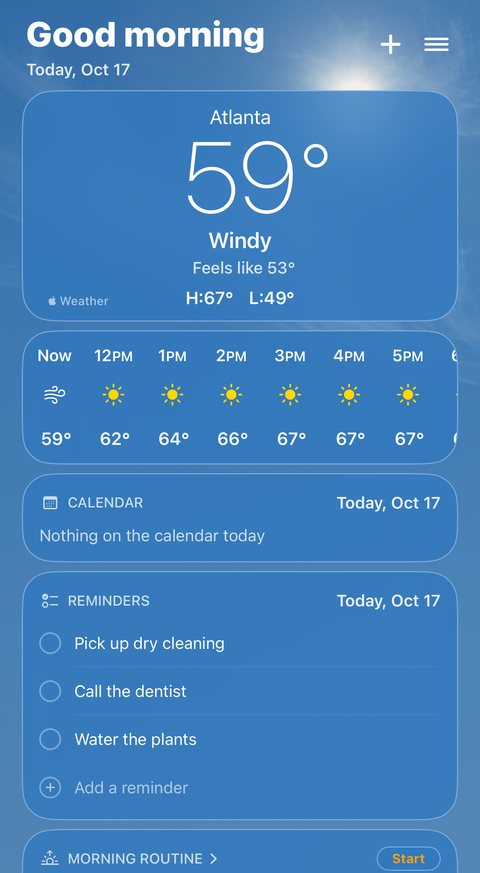
Everything you need before you head out, as cards you can hide and reorder.
Weather
From Apple Weather: the temperature, what it feels like, the day’s high and low, and the coming hours with sunrise, sunset and the chance of rain.
Calendar
Today’s events from the calendars you choose, each in its calendar’s color, with a line marking where you are in the day.
Reminders
What’s due today from the lists you choose. Check things off or add a reminder right on the card, and the change goes straight into Apple’s Reminders app.
Countdowns
Count the days to the things you’re looking forward to. Type one in, or add an upcoming event from your calendar with one tap.
A sky that matches the weather
Behind the page, a moving sky follows the weather outside: drifting clouds, stars at night, falling rain or snow.
Look at any day
Drag the date under the greeting to see any day up to a year either way, with that day’s forecast up to ten days ahead and the usual weather for that date after that.
Commute
Know exactly when to leave.
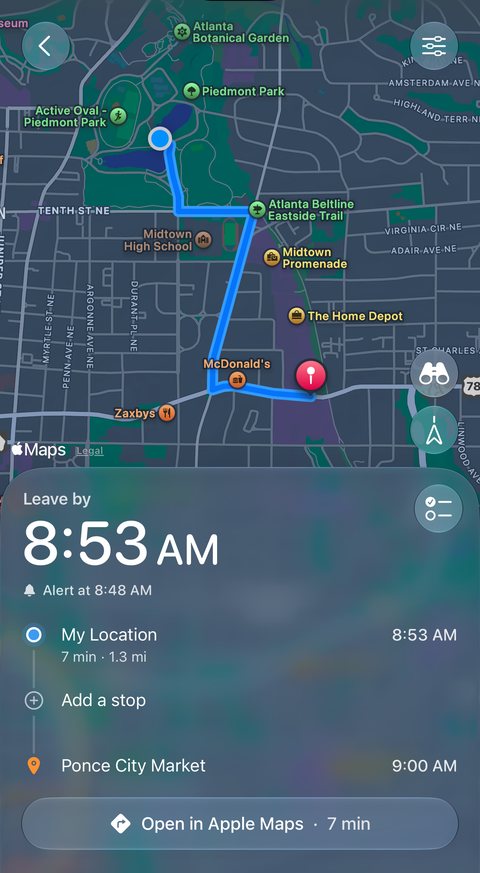
Set when you need to arrive, and Mornin’ works out when to leave using the traffic Apple Maps expects for that time. Or set when you want to leave and see when you’ll arrive.
Every kind of trip
Trips on set days of the week, one-time trips that clear themselves away after you arrive, or specific dates for shift work. Drive, walk or cycle.
Stops on the way
Add coffee, gas or any stop. Results are found along your route and show how many minutes each one adds.
A checklist for every trip
List what to take, like your keys or a water bottle. Your leave alert reminds you of anything you haven’t checked off.
Leave alerts
A heads-up before you need to go, then a notification at the leave time that opens your route in Apple Maps with one tap.
Trips from your calendar
Upcoming events with a location appear when you set up a trip. Tap one and Mornin’ fills in the place, the day and the time.
Widgets and lock screen
A small Leave by widget and a large Morning routine widget for your Home Screen. Open Mornin’ in the three hours before you leave, and your trip shows on your lock screen with a countdown.
Leave times are planned while the app is open. Your alarm time never moves on its own.
Help, built in
Meet Otis.
Otis is the bear who lives in Mornin’, and he isn’t a morning person either. Ask him how anything in the app works and he answers in plain words.
He suggests, you decide
Ask Otis for an alarm, a trip, a reminder, a routine or a countdown, and he shows it as a card. Nothing changes until you tap Accept.
Send him your schedule
Snap or pick a picture of your work schedule, and Otis can suggest your alarms for those days.
He asks first
Otis’s answers are written by AI, so he asks your permission before your first question. You can turn it off any time, and your calendar and reminders are never sent to him.
Streaks and badges
One morning at a time.
Your streak counts the days in a row you beat your alarm, and a day with no alarm set never breaks it. Earn fifteen badges for your best streak and keep them even if it resets. Here are eight of them.

First Light
Your first morning

Dawn Chaser
3 days in a row

Taking Root
14 days in a row

Medal of Mornings
60 days in a row
Summit
90 days in a row

Liftoff
100 days in a row
Sunrise Legend
500 days in a row

Thousand Sunrises
1,000 days in a row
Privacy
Privacy, in plain words.
Mornin’ has no ads, no tracking and no analytics, and nothing is sold. This is what happens to your information.
Your account
An account is required. We keep your email, display name, how you sign in and when your account was made. Delete Account in Settings permanently deletes your account and everything we hold for it.
A backup that only goes up
While you’re signed in, a copy of your alarms, routines and settings is saved to your account, including the code or phrase you set for a mission. It is never downloaded onto a phone, so nothing can change your alarms while you sleep.
Location, maps and weather
Your location is used only while the app is open, for your weather and your commute. It goes to Apple’s weather and maps services, never to our servers.
Calendar and reminders
Your calendar and reminders stay on your iPhone. They are never sent to our servers or to any AI.
Photo missions and Otis
Photo missions send your photos to Anthropic’s AI to be checked, and Otis sends your questions to OpenAI’s AI, each only with your permission. Both keep what they receive for up to 30 days and do not train on it. Barcode scans, light levels and what you say for Say it out loud are read on your iPhone and never sent.
Purchases
Apple handles every purchase. We never see your payment details.
Details
Mornin’ at a glance
| Developer | Retrofire LLC |
|---|---|
| Platform | iPhone only. There is no iPad, Apple Watch or Mac version. |
| Requirements | iOS 26 or later. An account is required: Sign in with Apple, Sign in with Google, or an email and password. |
| Language | English |
| Price | Free for your first 7 days, with no payment details needed. Then Mornin’ Pro, a monthly or yearly subscription through the App Store. Alarms you already set keep ringing if you don’t subscribe. |
| Internet | Needed for sign-in, weather, trip planning, photo checks and Otis. Alarms and the five built-in songs work without a connection. |
| Availability | In final testing. Coming to the App Store in fall 2026. |
| Website | getmornin.com |
| Support | getmornin.com/support support@getmornin.com |
| Privacy policy | getmornin.com/privacy |
| Terms of use | getmornin.com/terms |
Apple, iPhone, App Store, Apple Maps and Apple Weather are trademarks of Apple Inc., registered in the U.S. and other countries.
Questions about Mornin’?
Email support@getmornin.com or visit getmornin.com/support.